Managing your business finances efficiently is crucial for sustainable growth and success. Instantpay’s Business Wallet offers a convenient and secure platform to handle your business payments. This comprehensive guide will walk you through the process of adding funds to your Instantpay Business Wallet, ensuring a smooth and seamless experience
A business wallet typically refers to a financial account or a digital wallet specifically designed for managing business finances. It serves as a centralized platform where businesses can store funds, make payments, receive payments, track expenses, and manage their overall financial transactions. It also helps in separating personal and business expenses. This demarcation is crucial for accounting purposes, tax filings, and financial clarity.
Link your bank account to your Instantpay Business Wallet through the following steps:
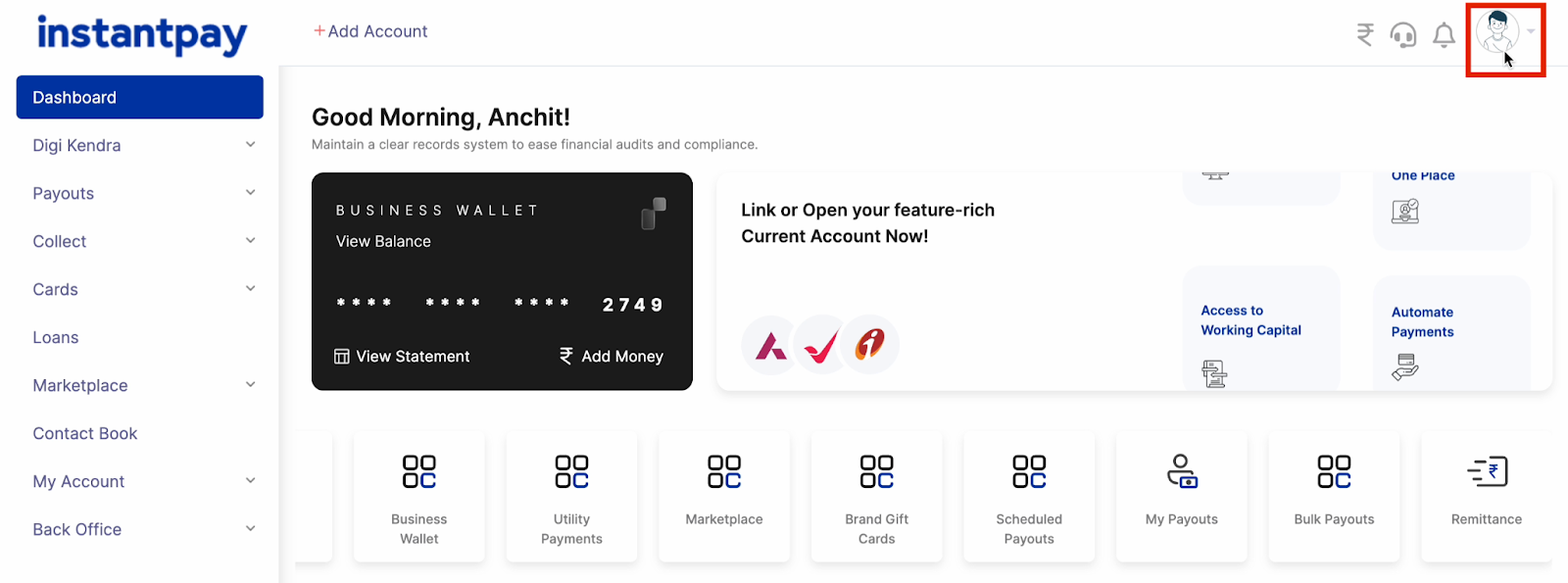
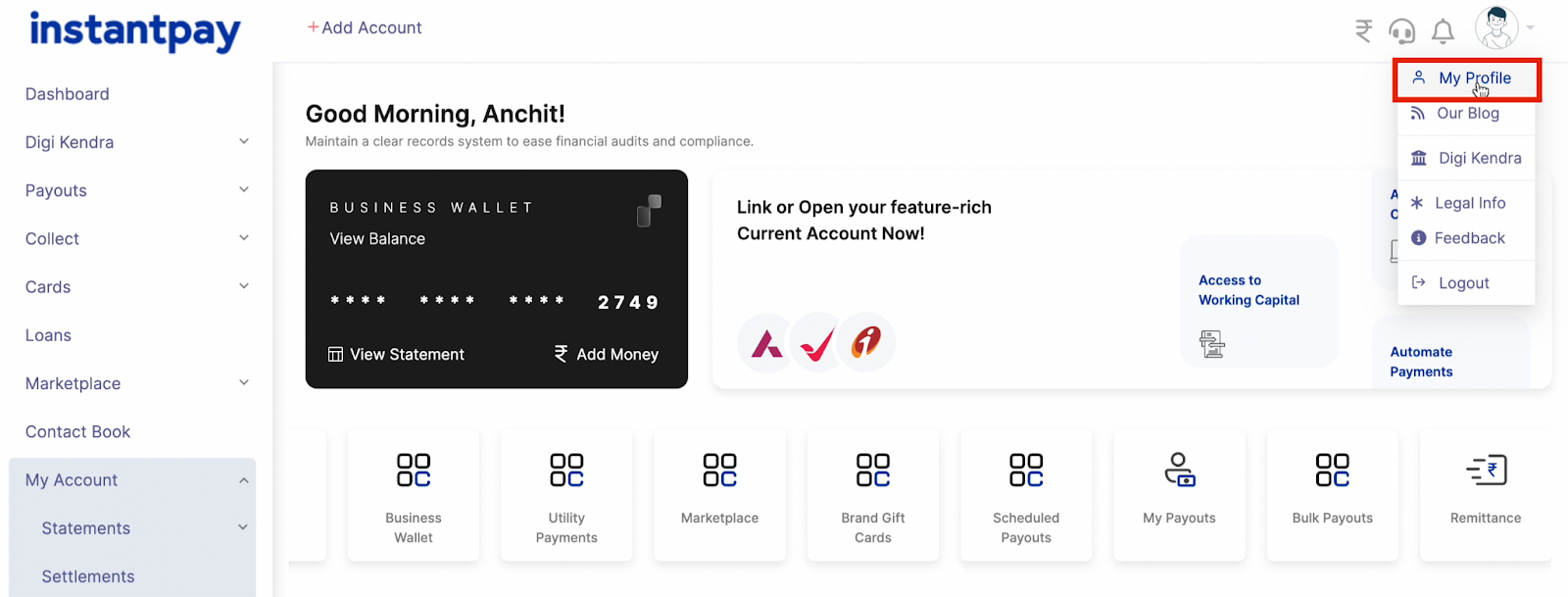
Step 1. Click on your display picture, then navigate to ‘My Profile.’
Step 2. Navigate to ‘My Profile.’
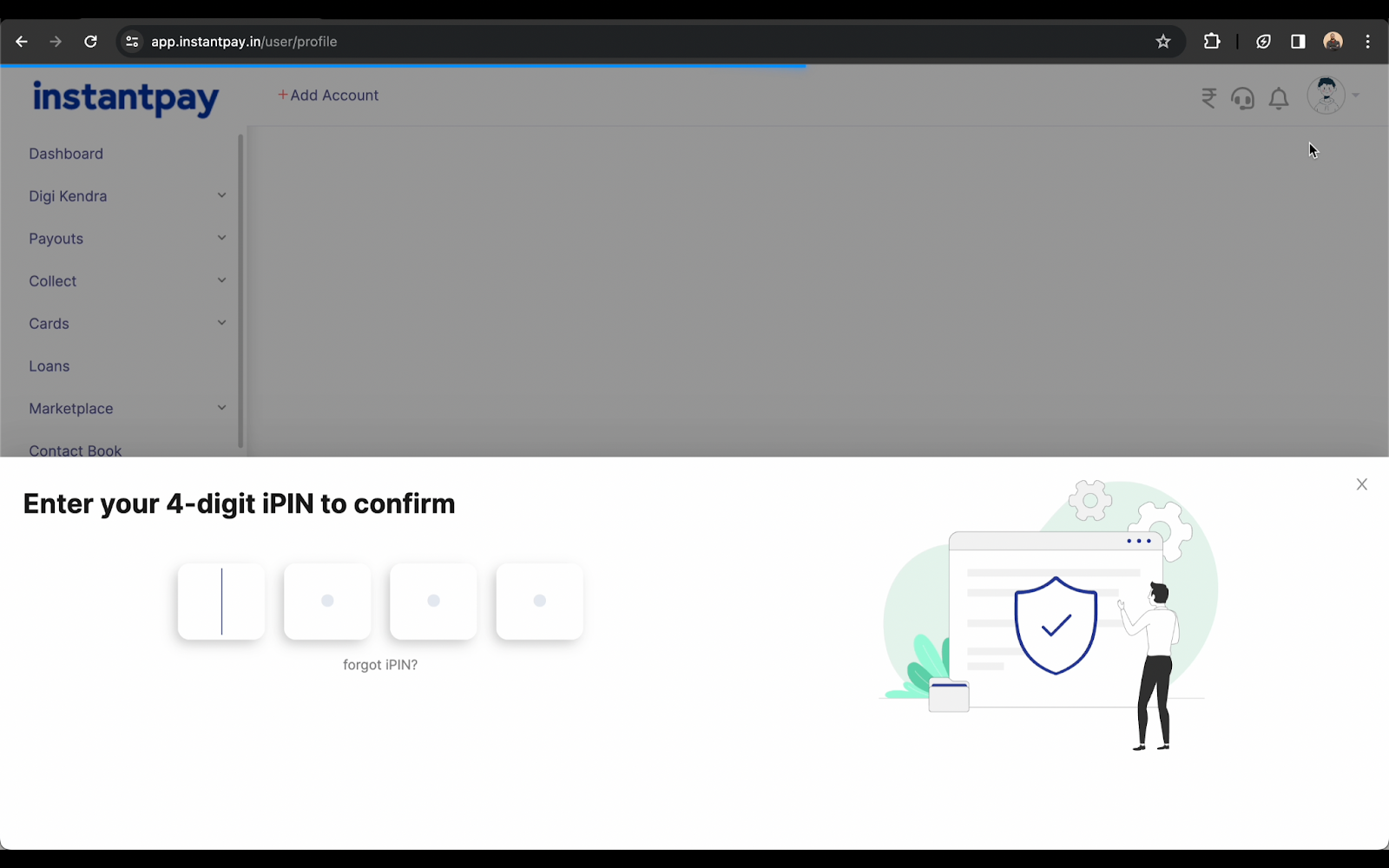
Step 3. Enter your PIN for verification.
Step 4. Click on ‘Linked Accounts.’
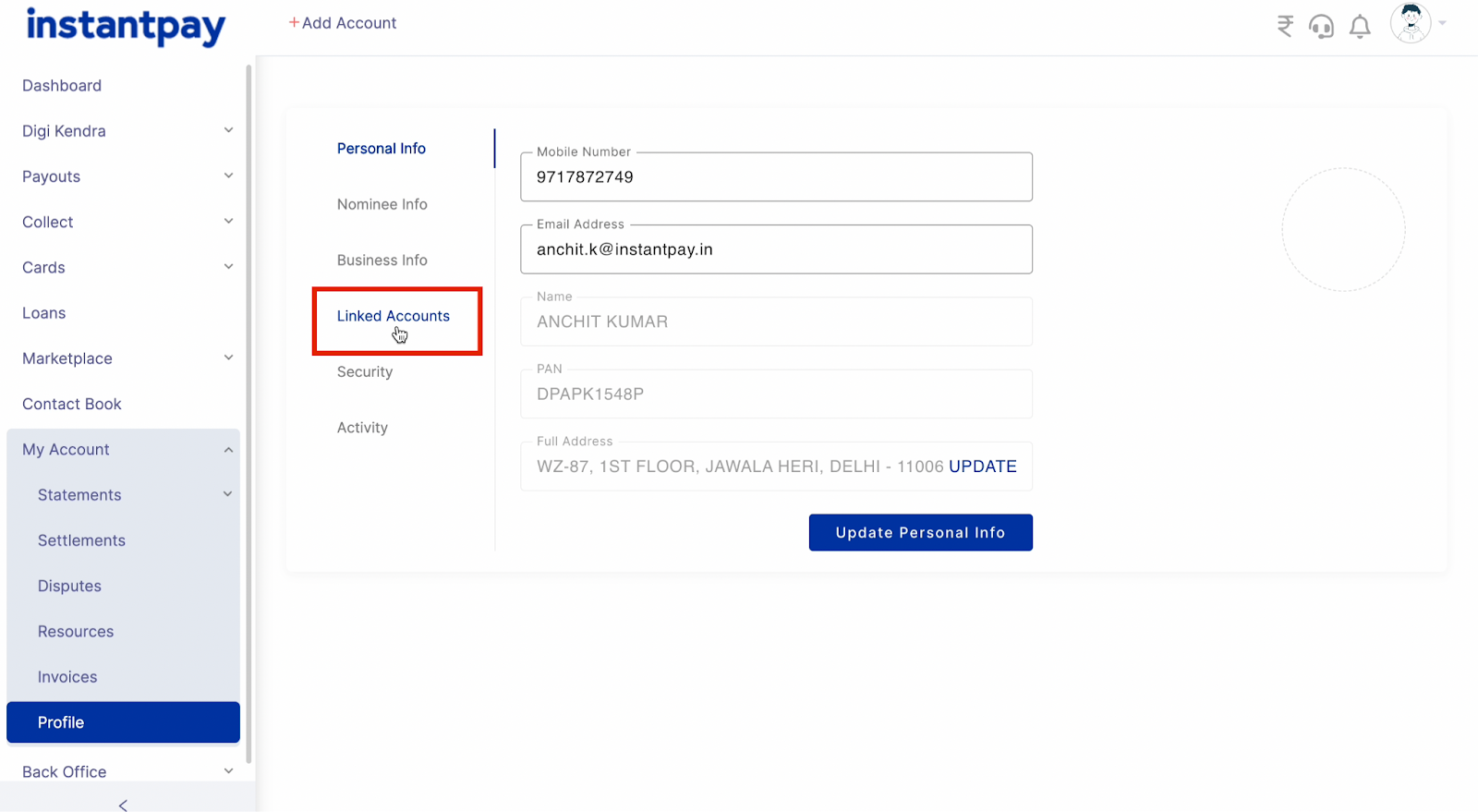
Step 5. Select ‘Add Bank Account.’
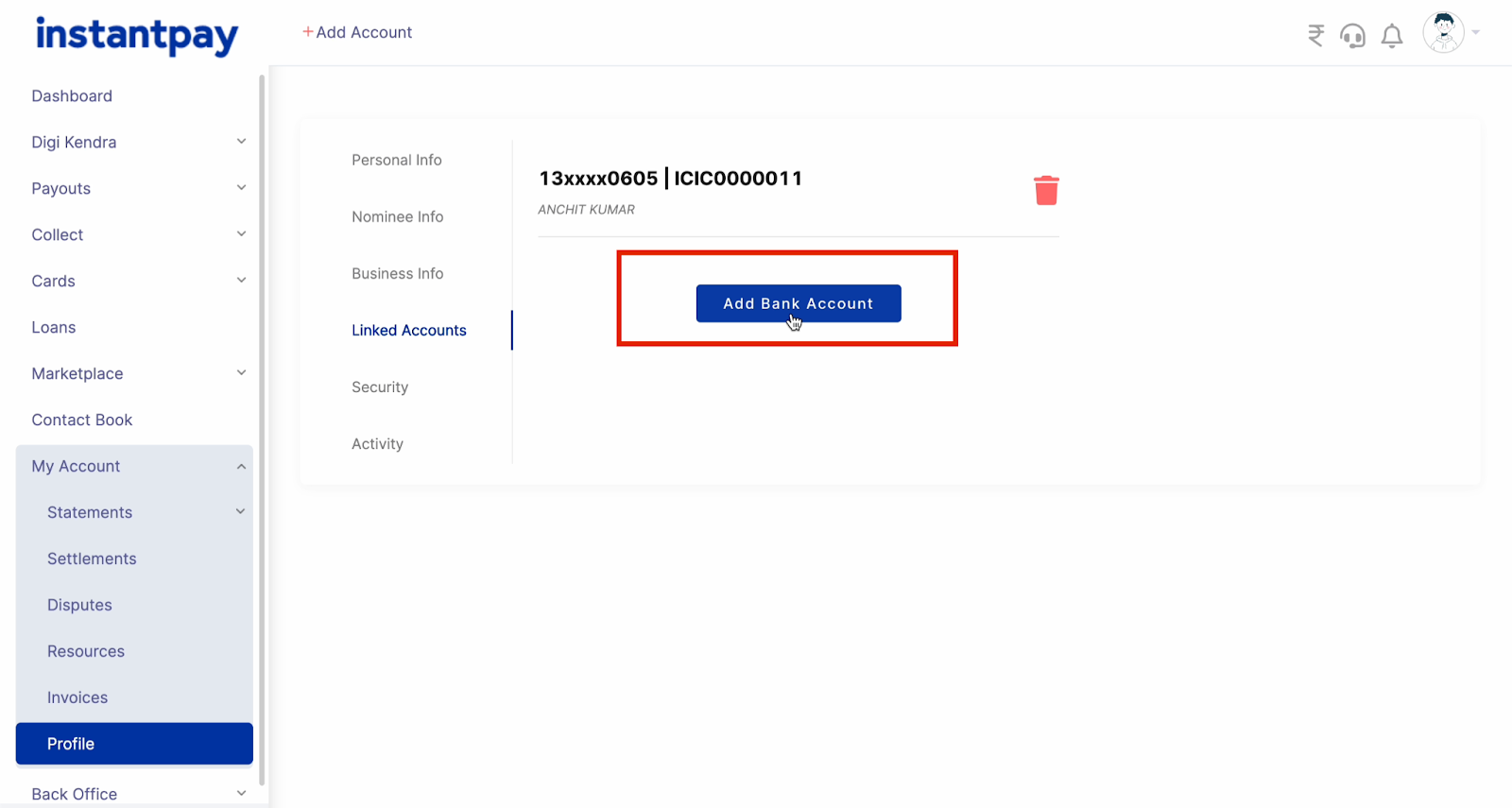
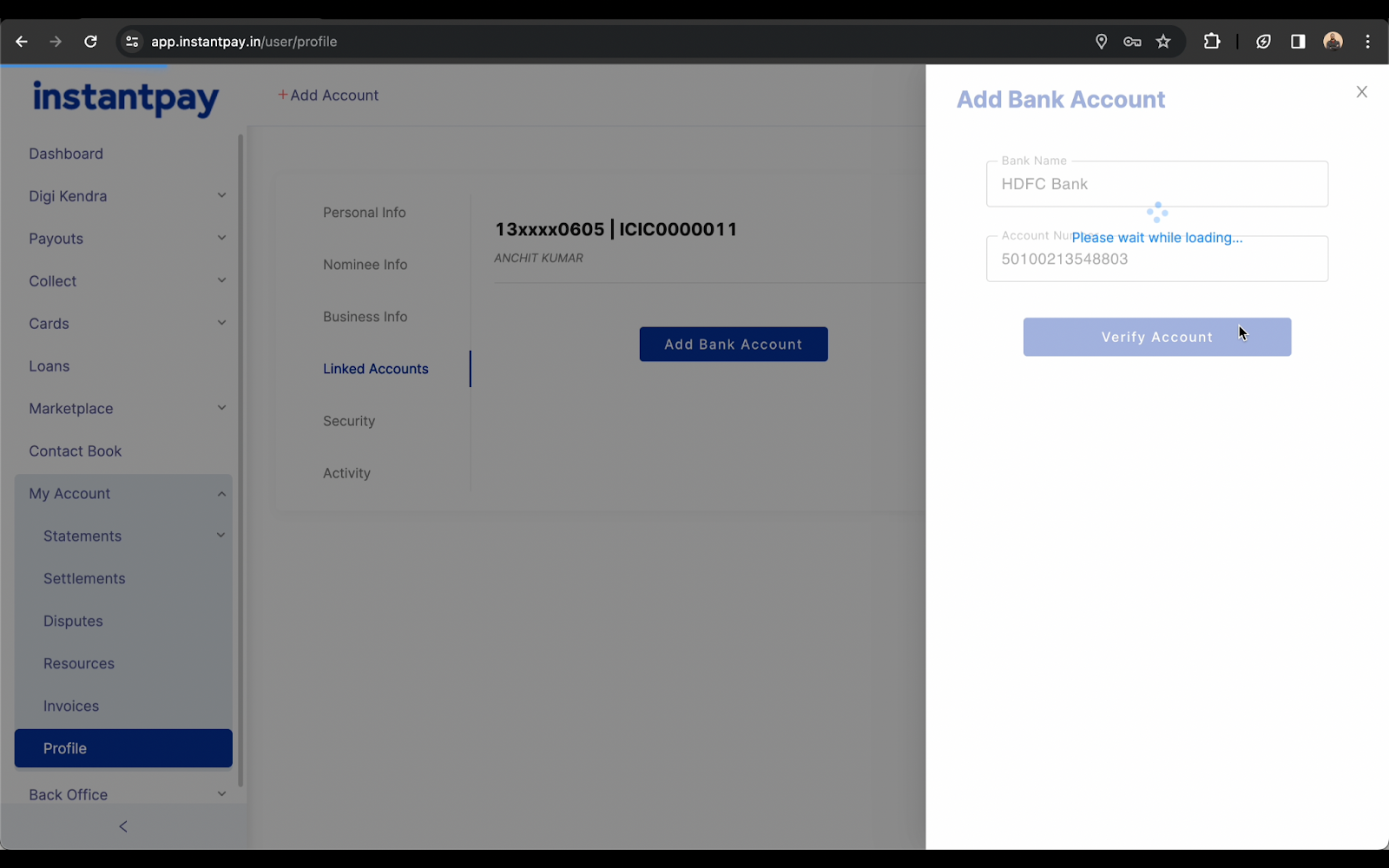
Step 6. Enter your bank name and account number, click on verify, and successfully link your bank account.
Step-by-Step Guide to Adding Funds to your Business wallet
Step 1. Navigate to the Instantpay Dashboard
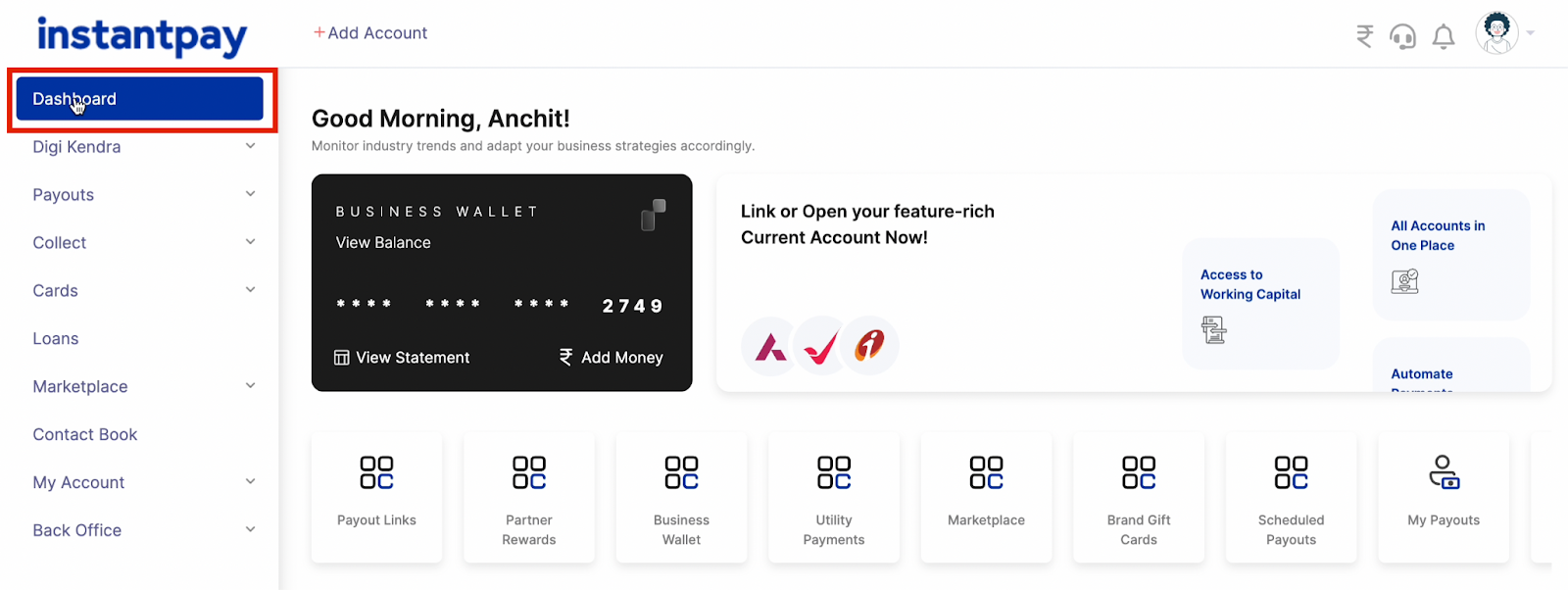
Step 2. Click on ‘Add Money’ or the ? icon located at the top left corner.
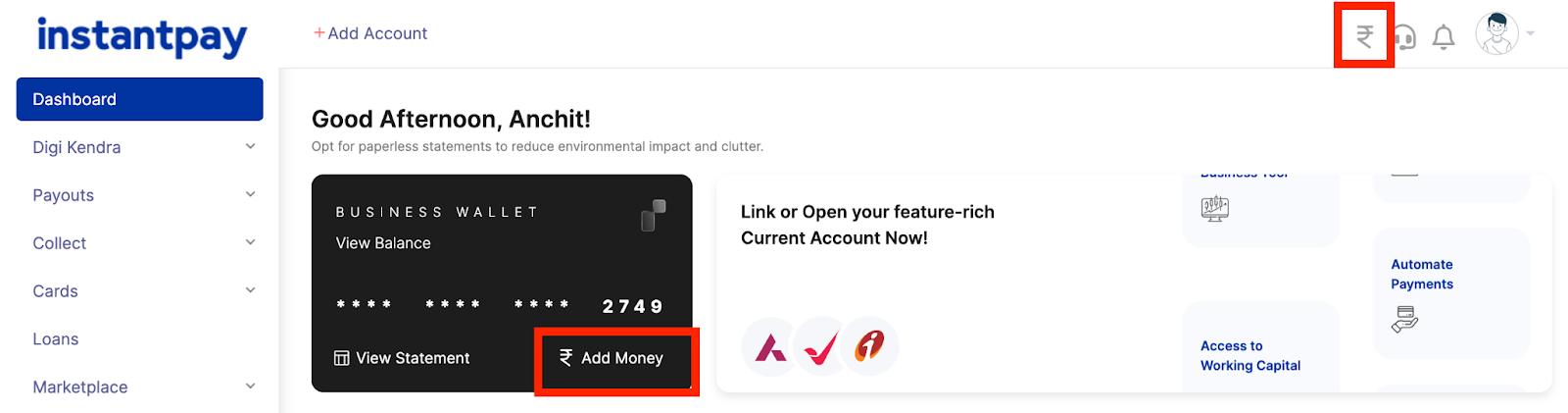
Step 3. Choose ‘Bank Transfer’ as your preferred method.
Step 4. Select your bank from the available options.
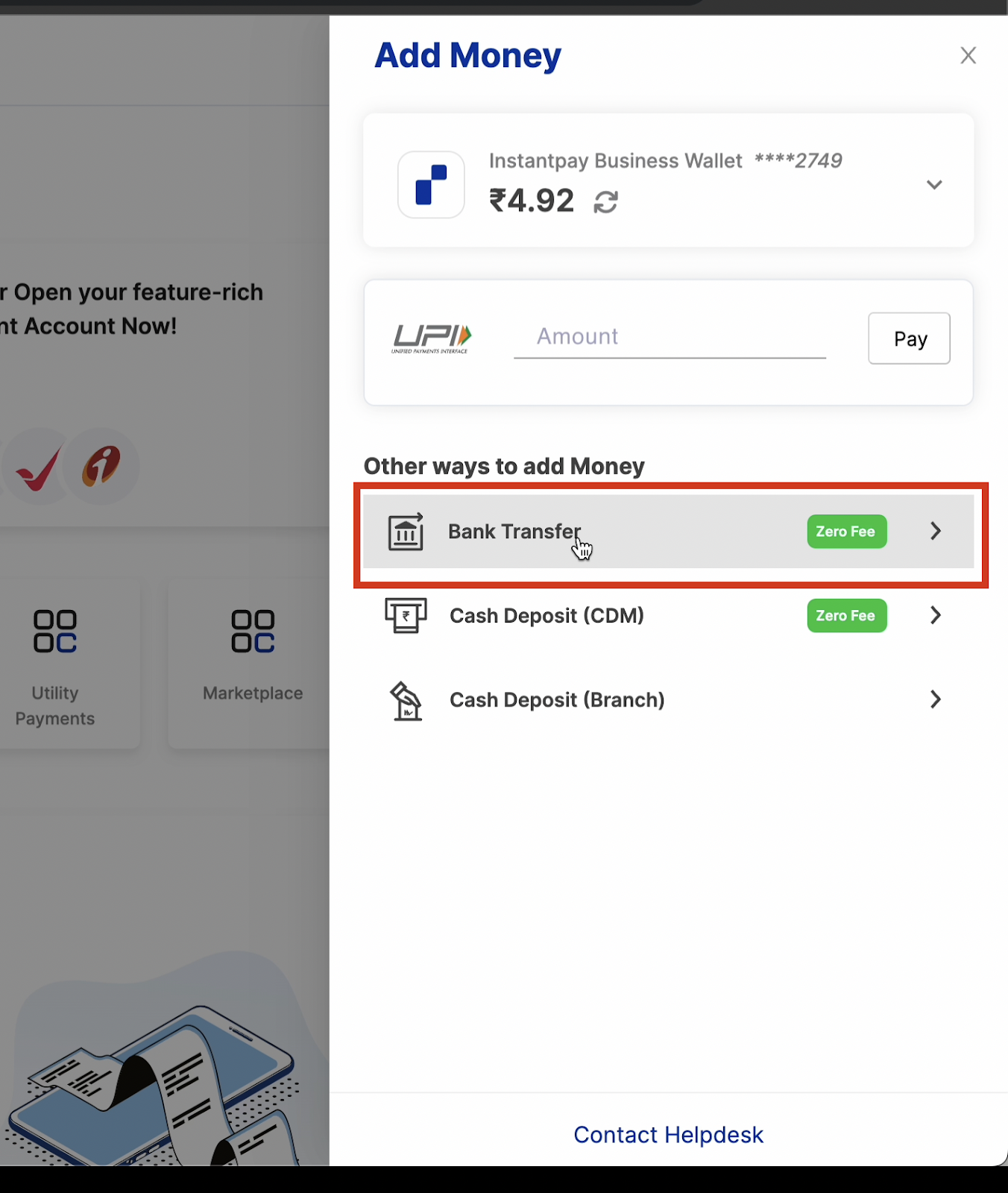
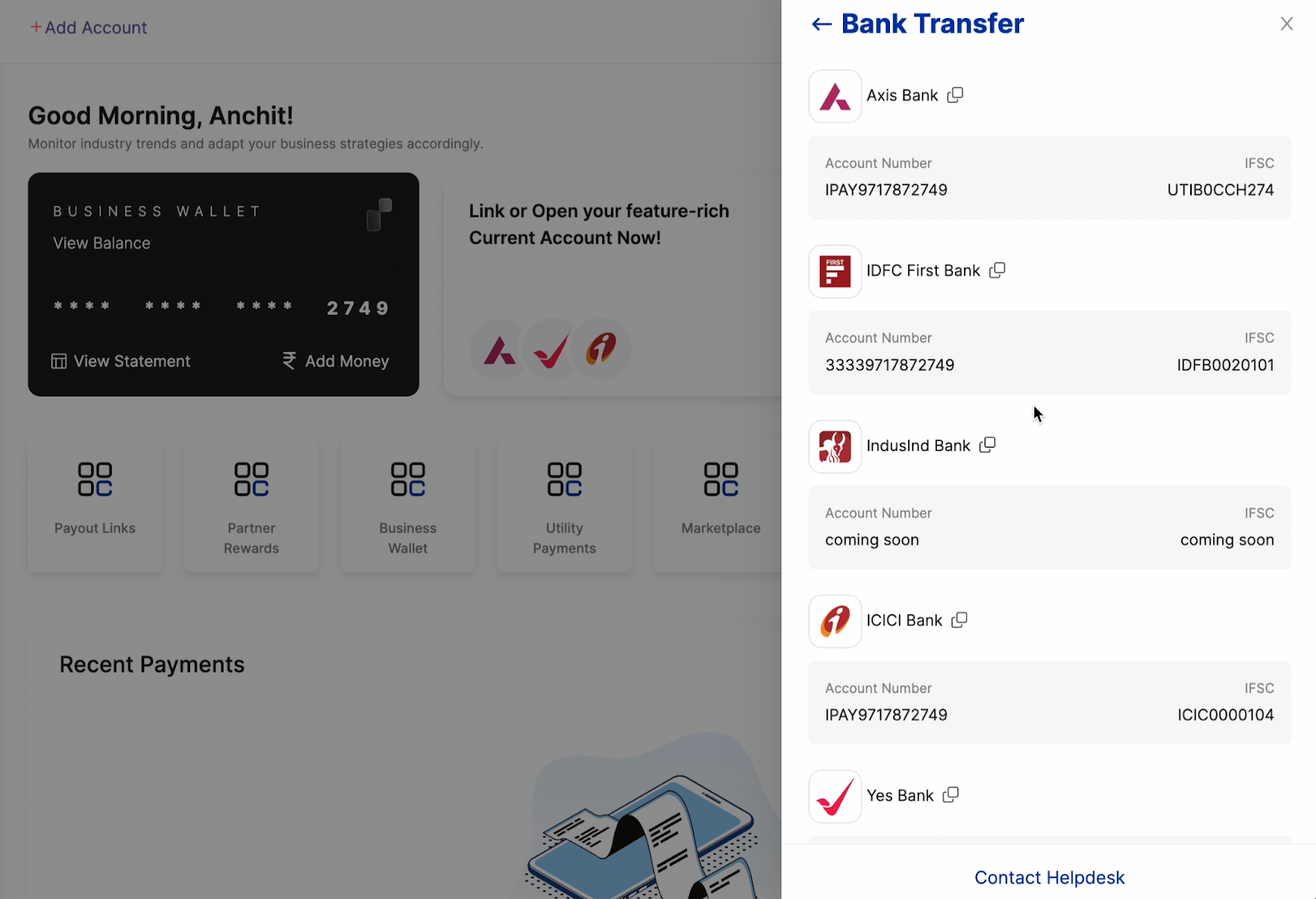
Step 5. Transfer funds directly from your bank account to your Instantpay Business Wallet.
Learn More:
– How Instantpay helps businesses simplify employee payments
– Instantpay Account Creation Process for Corporates
– A Guide to Efficient Payment Collection
What are the Methods to Add Funds to your Business Wallet?
Instantpay offers various methods to suit different business needs:
Bank Transfer
Bank transfer is one of the most common and convenient methods for adding funds to your Instantpay business wallet. To initiate a bank transfer, you need to link your business bank account with your Instantpay wallet. Once linked, you can transfer funds from your bank account to your Instantpay wallet instantly. This method is ideal for businesses that prefer electronic transactions and want to streamline their fund management process.
Cash Deposit (CDM)
For businesses that deal with cash transactions, a cash deposit is another viable option for adding funds to their Instantpay wallet. Instantpay allows businesses to deposit cash at designated partner locations, such as retail outlets or kiosks. To facilitate cash deposits, businesses are issued a Karur Vysya card. They simply present this card at a partner outlet, where it functions like a debit or credit card. The card is swiped, enabling seamless deposit of funds. Once the deposit is made, the funds are instantly credited to the business wallet, providing businesses with immediate access to their funds.
Cash Deposit from Branch
In addition to cash deposits at partner locations, Instantpay also offers the option for businesses to deposit cash directly from their branch offices. This method is particularly beneficial for businesses with multiple locations or branches spread across different geographical areas. To initiate a cash deposit from a branch, businesses need to deposit the cash using IFSC code and bank account details, which will facilitate the deposit process and ensure seamless transfer of funds to the business wallet.
Doorstep Cash Collection
For businesses that operate in remote or underserved areas where access to banking services is limited, doorstep cash collection offers a convenient solution for adding funds to their Instantpay wallet. Instantpay provides businesses with the option to schedule doorstep cash collection services, where a designated representative will visit the business premises to collect cash and credit it to the business wallet. This method not only ensures the safety and security of cash transactions but also provides businesses with the flexibility to manage their funds efficiently.
Why should you trust Instantpay with your business finances?
Compliance and Security for Businesses
Instantpay understands the importance of adhering to regulatory standards and safeguarding sensitive financial information. As a result, Instantpay’s Business Wallet is designed with robust compliance measures and security protocols to protect businesses and their assets.
Compliance: Instantpay complies with all relevant financial regulations and standards to ensure transparency and accountability in financial transactions. By adhering to regulatory requirements, Instantpay provides businesses with a trusted and compliant platform for managing their funds, mitigating the risk of regulatory fines or penalties.
Security: Instantpay employs state-of-the-art security measures to safeguard business funds and sensitive data. This includes encryption technologies, multi-factor authentication, and secure servers to prevent unauthorized access or data breaches. Additionally, Instantpay regularly conducts security audits and updates its systems to address emerging threats, ensuring a secure environment for businesses to conduct their financial activities.
By prioritizing compliance and security, Instantpay instills confidence in businesses, allowing them to focus on their core operations without worrying about financial risks or security breaches. Instantpay’s commitment to compliance and security sets it apart as a reliable partner for businesses seeking a safe and efficient platform for managing their finances.
Winding Up
Empower Your Business Finances
Managing business finances efficiently shouldn’t be a chore. Instantpay’s Business Wallet provides a secure and all-encompassing solution with various funding options tailored to your needs.
By following the steps outlined in this guide, you can easily add funds to your Instantpay Business Wallet and choose from various funding options such as bank transfers, cash deposits, and doorstep cash collection. Instantpay’s commitment to compliance, security, and convenience makes it a trusted partner for businesses looking to streamline their fund management processes and focus on growth and success. From bank transfers to doorstep cash collection, we make it easy to add funds and gain control of your finances. Plus, our robust compliance and security measures ensure your money and data are protected.

Frequently Asked Questions
- What is Instantpay’s Business Wallet?
Instantpay’s Business Wallet is a financial account or digital wallet specifically designed for managing business finances. It offers a centralized platform for storing funds, making payments, receiving payments, tracking expenses, and managing financial transactions. - How do I add funds to my Instantpay Business Wallet?
– Link your bank account to your Instantpay wallet by navigating to ‘My Profile,’ then ‘Linked Accounts,’ and selecting ‘Add Bank Account.’
– Once your bank account is linked, navigate to the Instantpay Dashboard, click on ‘Add Money,’ choose ‘Bank Transfer’ as your preferred method, select your bank, and transfer funds from your bank account to your Instantpay Business Wallet. - Is there a maximum limit on the amount I can add to my Instantpay Business Wallet?
Instantpay allows you to add funds as per your own will. There is no such limit on the account you want to add. - How long does it take for funds to reflect in my Instantpay Business Wallet after a successful transfer?
Typically, funds transferred via bank transfer or cash deposit are credited to your Instantpay Business Wallet within an hour. However, the processing time may vary based on the funding method, banking hours, and external factors such as bank processing times. - What funding options does Instantpay offer for adding funds to the Business Wallet?
Instantpay offers various funding options tailored to different business needs:
– Bank Transfer: Instantly transfer funds from your linked bank account to your Business Wallet.
– Cash Deposit (CDM): Deposit cash at partner locations using a Karur Vysya card.
– Cash Deposit from Branch: Deposit cash directly from your branch office using IFSC code and bank account details
– Doorstep Cash Collection: Schedule cash collection services at your business premises for added convenience. - Why should I trust Instantpay with my business finances?
Instantpay prioritises compliance and security, ensuring transparency, accountability, and protection of sensitive financial information. Compliance measures and security protocols are in place to mitigate risks and provide businesses with a trusted platform for managing their finances securely. - How can Instantpay’s Business Wallet empower my business finances?
Instantpay’s Business Wallet empowers businesses by providing a secure and comprehensive solution with various funding options. It simplifies fund management and ensures compliance and security, allowing businesses to focus on their core operations without financial worries. - Can I withdraw funds from my Instantpay Business Wallet to my bank account?
Yes, Instantpay allows you to withdraw funds from your Business Wallet to your linked bank account. Simply navigate to the withdrawal section in the Instantpay app or website, enter the withdrawal amount, and follow the prompts to initiate the transfer. - What security measures does Instantpay employ to protect my Business Wallet and transactions?
Instantpay employs industry-leading security measures, including encryption technologies, multi-factor authentication, secure servers, and regular security audits. These measures safeguard your Business Wallet and transactions, protecting them from unauthorized access, fraud, and data breaches. - Can I track and monitor my business transactions within Instantpay’s Business Wallet?
Yes, Instantpay provides comprehensive transaction tracking and monitoring tools within the Business Wallet. You can view transaction history, monitor incoming and outgoing payments, generate financial reports, and gain insights into your business finances for better decision-making.